NewApple Watch and Home Screen widgets

PumpPal makes every ounce visible.

Track pump sessions, freezer stash, and goals in one place. Start a pump from your wrist or your Home Screen. PumpIQ turns your logs into trends and a steady estimate of your last pumping day.

Download on theApp Store
Free for 7 days. Then choose whether to unlock forever for $4.99 — there is no automatic charge. Private by design. PumpIQ included.
  • iPhone
  • Apple Watch
  • Widgets
  • PumpIQ
  • Private
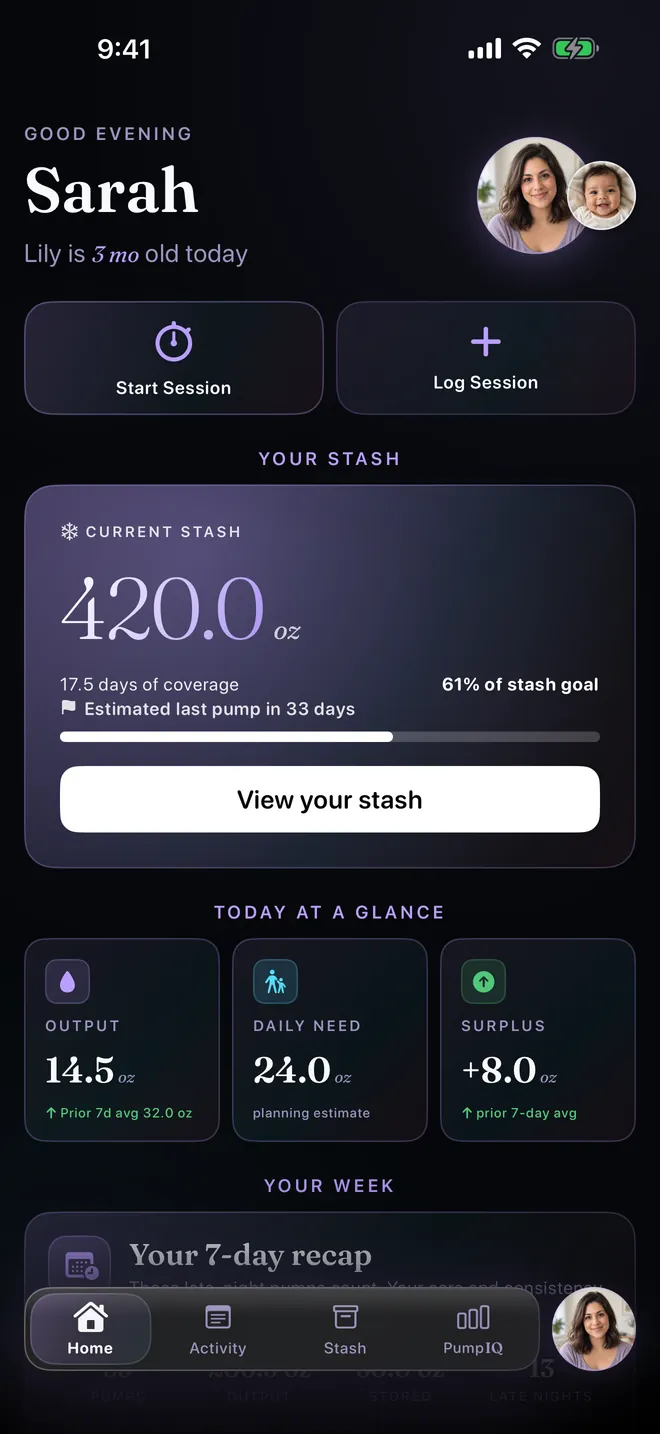
PumpPal Home on iPhone: 420 ounces in the freezer stash, 17.5 days of coverage, an estimated last pump in 33 days, and today's output of 14.5 ounces.
New in PumpPal

One night, measured.

Apple Watch, Home Screen widgets, and steadier estimates, in the time it takes to pump.

01Night

3:12 am. The house is asleep.

You're up again. PumpPal is built for this hour: dark, quiet, and easy to read with one eye open.

02Wrist

Start from your wrist.

Tap Start Pump on Apple Watch and the timer runs on your wrist. Your iPhone keeps the record, so keep it nearby when you start.

03Finish

End on your Watch. Finish on iPhone.

End the pump from your wrist. It waits safely on Home, under “Finish logging your pump,” until you add the amount on iPhone.

04Counted

Every ounce, counted.

Save 4.5 oz and it shows right away in today's output and your stash. Timed pumps are kept even if PumpPal closes first, and can't be saved twice.

05Home Screen

Your pump, one tap away.

Small and medium widgets show time since your last pump, a Start Pump button, and a live timer while you pump. The medium widget adds your estimated last-pump date.

06Steady

A plan that holds steady.

Estimates use your last 7 full days, so an early pump no longer makes your plan look worse. Today's pumps count right away and join the average after midnight.

PumpIQ projection

Your logs become a clear plan.

PumpIQ connects the pieces you already track: sessions, freezer stash, daily intake, and your goal. Then it projects your supply, stash, and last-pump date.

  • Smart trends and goal projections from your logs.
  • Updates when your stash or goal changes, and again each new day.
  • Shows the date, your stash by then, and the daily numbers behind it.
Your countdown
Example
211
days to go

Stash today 142 oz of 817 oz by your last pump

Sarah · 4 months in
Stash
142oz
Daily intake
26oz
Surplus
+3.2oz/day

Three example scenarios, using a simplified version of the PumpIQ math. In PumpPal, estimates also account for planned feeding changes and storage windows.

Apple Watch + Home Screen widgets

Your pump, closer at hand.

Start, time, and end a pump from your wrist or your Home Screen. Included with PumpPal, with no extra purchase.

PumpPal on Apple Watch, ready: last pump 2 hours ago, with a Start Pump button. PumpPal on Apple Watch after ending a pump: Pump ended. Add the amount on your iPhone.
The iPhone Home screen card: Finish logging your pump. Started 2:54 AM, 18 minutes, ended on Apple Watch, with an Add amount button.

Ready: the Watch shows how long it's been since your last pump.

Apple Watch

  • Start a pump, see the timer, and end it from your wrist.
  • Add the amount on iPhone afterward. A pump ended on the Watch waits safely on Home, under “Finish logging your pump,” until you do.
  • Your iPhone keeps the only record. Starting a pump needs your iPhone nearby. If you tap End while it's out of reach, the Watch saves the time you tapped and sends it once they reconnect.
  • Needs watchOS 10 or later, paired with an iPhone running PumpPal.
Medium PumpPal widget: last pump 2 hours ago, a Start Pump button, and an estimated last pump on October 30, 33 days to go.
Small PumpPal widget with the pump paused at 12 minutes 32 seconds and an Open Timer button.

Tap Start Pump on the small widget to start a live timer.

Home Screen widgets

  • Small and medium sizes.
  • Both show the time since your last pump, a Start Pump button, and a live timer while you pump (or Paused).
  • The medium widget adds your estimated last-pump date or stash-goal estimate.
  • Widgets show what's on your iPhone. Nothing is sent anywhere.

Included with PumpPal. The Apple Watch app and widgets need no separate purchase. After the 7-day trial, until you unlock, the Watch asks you to open PumpPal on iPhone.

25-second tour

Watch one night with PumpPal.

From a 3:12 am start on Apple Watch to a plan that holds steady, in 25 seconds. It plays quietly; sound is always your choice.

Demo data only: “Sarah” and “Lily” are fictional.

Steadier estimates

A plan that holds steady.

Long-term estimates use your last 7 full days, so an early pump no longer makes your plan look worse. Today's pumps show right away in today's totals and your stash, and join the average after midnight.

The date moves when real things change

  • Stash added or used
  • A goal or feeding change
  • Edits to earlier days
  • A new full day

New to PumpPal? You'll see “more logs needed” until your first full day.

Estimated last pump
In 33 days
33 days to go
Unchanged
Daily output for the last 7 full days, averaging 32.0 ounces a day, plus today's bar, which joins the average after midnight.
Today
0.0oz
Average, last 7 full days
32.0oz/day

Your average and your date stay put. Today's 4.5 oz counts in today's total right away.

Before this update, counting today as a full day would have shown 28.1 oz/day and made the date look worse until more of the day was logged.

By the numbers

Pumping is invisible labor. Until you measure it.

Built from the lived reality of r/ExclusivelyPumping: supply anxiety, freezer stash math, and the numbers moms check at 3am.

3hrs
The window between pumps most EP mothers hold every single day, including overnight, for months.
Source · r/ExclusivelyPumping
909oz
One mom's freezer stash when she had to move cross-country. That's seven months of baby's intake.
Source · r/ExclusivelyPumping
#1
Supply anxiety is the most frequent emotional theme in the community — 140oz one week, 120oz the next, and panic sets in.
Source · r/ExclusivelyPumping
From the pumping community

Built around the questions moms keep asking.

Across r/ExclusivelyPumping, the same themes surface again and again: tracking fatigue, freezer-stash uncertainty, supply anxiety, and wanting to know when pumping can finally end.

Black postpartum mother and white father sharing a sunny morning walk with their sleeping baby in a stroller
Tracking fatigue

Logging should give time back

Moms describe alarms, notes, spreadsheets, and mental math layered onto an already demanding routine. PumpPal keeps the daily picture in one focused place, on your phone, your wrist, or your Home Screen.

Latina mother organizing a breast milk freezer stash while the baby's father holds their child nearby
Freezer-stash uncertainty

Is this stash actually enough?

A freezer total alone cannot answer that. PumpPal connects saved milk with daily intake, surplus, coverage, and the goal ahead.

Asian postpartum mother holding her smiling baby beside a cooler and two capped baby bottles in a sunny kitchen
The finish line

When could my last pump be?

PumpIQ turns session history, intake, stash, and a target date into an estimate that holds steady through the day and updates as real life changes.

These are paraphrased themes observed in public discussions from r/ExclusivelyPumping, not individual testimonials or medical claims. PumpPal provides tracking and projections, not medical advice.

How it works

From your first session to your last.

Four practical steps. No setup marathon, no account, no cloud.

  1. Log a session

    Tap once to start the timer on iPhone, Apple Watch, or a widget, or enter ounces after the fact. Works one-handed, in the dark.

  2. See your stash

    Every ounce adds up. See your freezer stash and 7-day trend in one glance.

  3. Check PumpIQ

    Use recent output, stash, intake, and your goal date to see if you're ahead, behind, or on pace.

  4. Reach your last day

    The countdown lands on an estimated date, so you can plan the day you put the pump away.

What's inside

PumpPal tracks the work. PumpIQ adds context.

Built for the dim room, the full arm, and the half-asleep glance at the clock.

Last-pump date

An estimated date for your last pump, powered by PumpIQ. It uses your last 7 full days, and updates when your stash or goal changes and each new day.

Project your stash

Trends turn single sessions into a projection of your stash.

One-handed logging

Start, pause, or backfill a session with your thumb. Timed pumps are kept if PumpPal closes before you enter an amount, and can't be saved twice.

PumpIQ insights

Plain-language trends paired with the numbers behind them.

Apple Watch companion

Start, time, and end a pump from your wrist, then add the amount on iPhone. Included, with watchOS 10 or later.

Home Screen widgets

Time since your last pump, Start Pump, and a live timer, in small and medium sizes. The medium one adds your estimate.

A look inside

Designed for 3am.

Dark mode, big numbers, adaptable text, and controls that reflow for easier reading. Built for the moment you're actually using it.

Built for the reality of new motherhood.

Big numbers. Clear hierarchy. No judgment. Designed for late nights, full arms, and the tiny windows of time between everything else.

Your data stays on your device.

No accounts. No cloud uploads. No ads. No analytics. PumpPal works offline, because the last thing you need at 3am is a login screen. What's yours is yours, and you can download your data anytime.

Apple Watch talks directly to your iPhone, and the widgets show what's on your iPhone.

  • On-device only
  • No account required
  • Download CSV anytime
  • Works offline
Good questions

Things moms ask us.

Short answers. If something's missing, email us.

Where can I download PumpPal?

PumpPal is available now on the App Store for iPhone. Download PumpPal here.

What is PumpIQ?

PumpIQ is the built-in projection feature inside PumpPal. It uses your session history, freezer stash, baby's daily intake, and goal date to estimate where your supply is headed, how long your stash may last, and when your last pumping day could be.

How does the countdown actually work?

PumpIQ looks at your current freezer stash, your average daily output over the last 7 full days, your baby's daily intake, and your target date. It projects your stash forward day by day and finds the last day you can pump while what you've saved still covers you through your goal. That day is your estimated last pump. Today's pumps join the average after midnight.

Why doesn't my estimate change right after I pump?

Long-term estimates use your last 7 full days, so an early pump no longer makes your plan look worse. Today's pumps show right away in today's totals and your stash, and join the average after midnight. The date moves when real things change: stash added or used, a goal or feeding change, edits to earlier days, or a new full day. New users see “more logs needed” until their first full day.

Does PumpPal work with Apple Watch?

Yes. With watchOS 10 or later and an iPhone running PumpPal, you can start a pump, see the timer, and end it from your wrist. Add the amount on iPhone afterward. A pump ended on the Watch waits safely on Home, under “Finish logging your pump,” until you do. Your iPhone keeps the only record, so starting a pump needs your iPhone nearby. If you tap End while your iPhone is out of reach, the Watch saves the time you tapped and sends it once they reconnect. The Watch app is included, with no separate purchase.

Are there Home Screen widgets?

Yes, in small and medium sizes. Both show the time since your last pump, a Start Pump button, and a live timer while you pump (or Paused). The medium widget adds your estimated last-pump date or stash-goal estimate. The widgets show what's on your iPhone and are included with PumpPal.

Do I need an account?

No. No sign-up, no email, no password, no cloud. Install, open, start logging. Your data lives in one place: your iPhone.

Is PumpPal private?

Yes. There's no account, no cloud, no ads, and no analytics, and your pumping data stays on your iPhone. Apple Watch talks directly to your iPhone, and the widgets show what's on your iPhone.

How much does it cost?

PumpPal is free for 7 days. After that, you choose whether to unlock it forever for $4.99 — there is no automatic charge. PumpIQ projections, goals, trends, CSV data downloads, the Apple Watch app, and widgets are included. No subscriptions. No ads. After the trial, until you unlock, the Watch asks you to open PumpPal on iPhone.

What devices does it support?

iPhone on iOS 17 or later, plus the Apple Watch companion (watchOS 10 or later, paired with that iPhone) and Home Screen widgets. iPad and Android aren't on the current roadmap.

Can I download my data?

Yes. Download every session as a CSV anytime. Your data is yours to take with you.

Does PumpPal give medical advice?

No — PumpPal tracks and projects from the data you enter. It's not a lactation consultant. For medical questions about your supply or your baby's needs, talk to an IBCLC or your pediatrician. We'll handle the numbers; they'll handle the care.

Every pump. Every ounce.

Try PumpPal free for 7 days, then choose whether to unlock forever for $4.99 — with no automatic charge. Session tracking, stash goals, PumpIQ projections, the Apple Watch app, and widgets, all in one focused app.

Download on theApp Store

Questions, ideas, or something not working? Email hello@mypumppal.com. A real person reads every message.